Types of Scan Tools
An automotive scan tool is an electronic device used by technicians to decode serial data, communicate with modules, diagnose problems, and, in some cases, reprogram vehicle control modules.
Remember that a scan tool is only as good as the user’s understanding of the data. When used with the proper reference materials, a scan tool can significantly help a knowledgeable, experienced technician perform computer-related diagnostics. Often, the device is more than a help; it's a necessity. But it cannot solve problems on its own. Understanding the data and accurately interpreting the displayed information is key. The technician, not the tool, is the diagnostician.
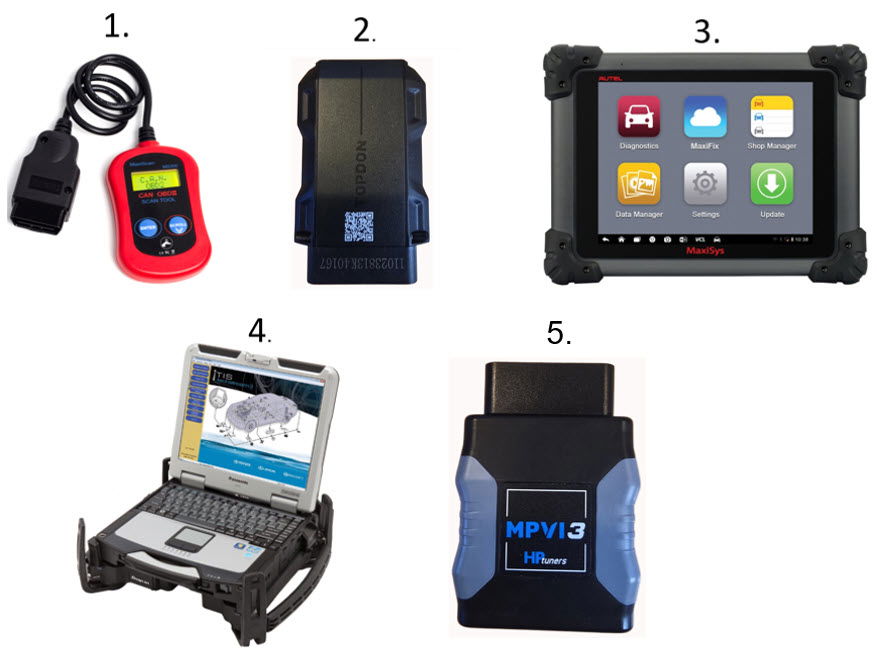
Five Types of Scan Tools are available:
- Code Readers – They are inexpensive and quick, but they might not provide all the Global MODEs.
- Bluetooth for Smartphones – moderately priced but might not provide all the Global MODEs.
- Aftermarket will display Global OBD II and Enhanced (OEM Level in most cases).
- OEM factory-specific, but they may not include any or all of the Global OBD II MODES.
- Aftermarket Tuner Dongle.
A scan tool can be wired or Wireless (Bluetooth), handheld, or PC-based. To achieve a higher level of diagnostics, a Global Code Reader and Bluetooth for iOS and Smartphones will not suffice.
Two options are available when using an aftermarket scan tool and technician, and there are advantages to both:
Global (EOBD) OBD II:
- The system might not be identified by Make, Model, or Year (Note: Some Global Scan Tools can identify the vehicle based on the VIN).
- Talks in standard Protocols to all systems.
- Pre-CAN PIDS can be limited.
- PIDS can be extensive, and some PIDS the Aftermarket Enhanced scan tools do not provide.
- Provide many PIDS similar to Enhanced OBD II, but may identify them using different terminology.
- It provides no bi-directional testing and can only command the EVAP Vent Solenoid On, if available.
- It will communicate with emission-related modules like the Engine Control Module (ECM) and Transmission Control Module (TCM).
Aftermarket Enhanced (OEM) OBD II:
- Does identify the system by VIN, Make, Model, and Year.
- Talks using the protocol specific to the individual manufacturer.
- It provides many PIDS similar to Global but may identify them using different terminology.
- It might provide PIDS not found in Global OBD II. PIDS might be divided into pages.
- Provides Bi-Directional Testing of specific Outputs.
- It may provide reprogramming options.
- Can communicate with most, if not all, modules on the vehicle.
Additional Scan Tool Features:
Combining an aftermarket Scan tool and online Service Information
The global scan tool can be combined with an online service information subscription. In the following video, the INNOVA 7111 tablet will be combined with MOTOR Repair Service. Once a confirmed DTC triggers a MIL, the tool will link to MOTOR. There is a fee for accessing this online service. This video shows a first signup to MOTOR with a 30-day free trial.
MORE INFORMATION TO BE ADDED SOON.
Pre and Post Scans
The importance of pre- and post-scan data cannot be overstated. With the addition of numerous onboard computers/modules, it is essential to understand what they contain and how they could impact the diagnostic process. It helps the technician to avoid the "I didn't know" syndrome. The post-scan verifies repair for the technician and the consumer.
Under current regulations, per SAE 1979-1 Global OBDII, the only computers available for viewing are the engine and transmission. The OEMs are not required to make this information available to the global scan tool.
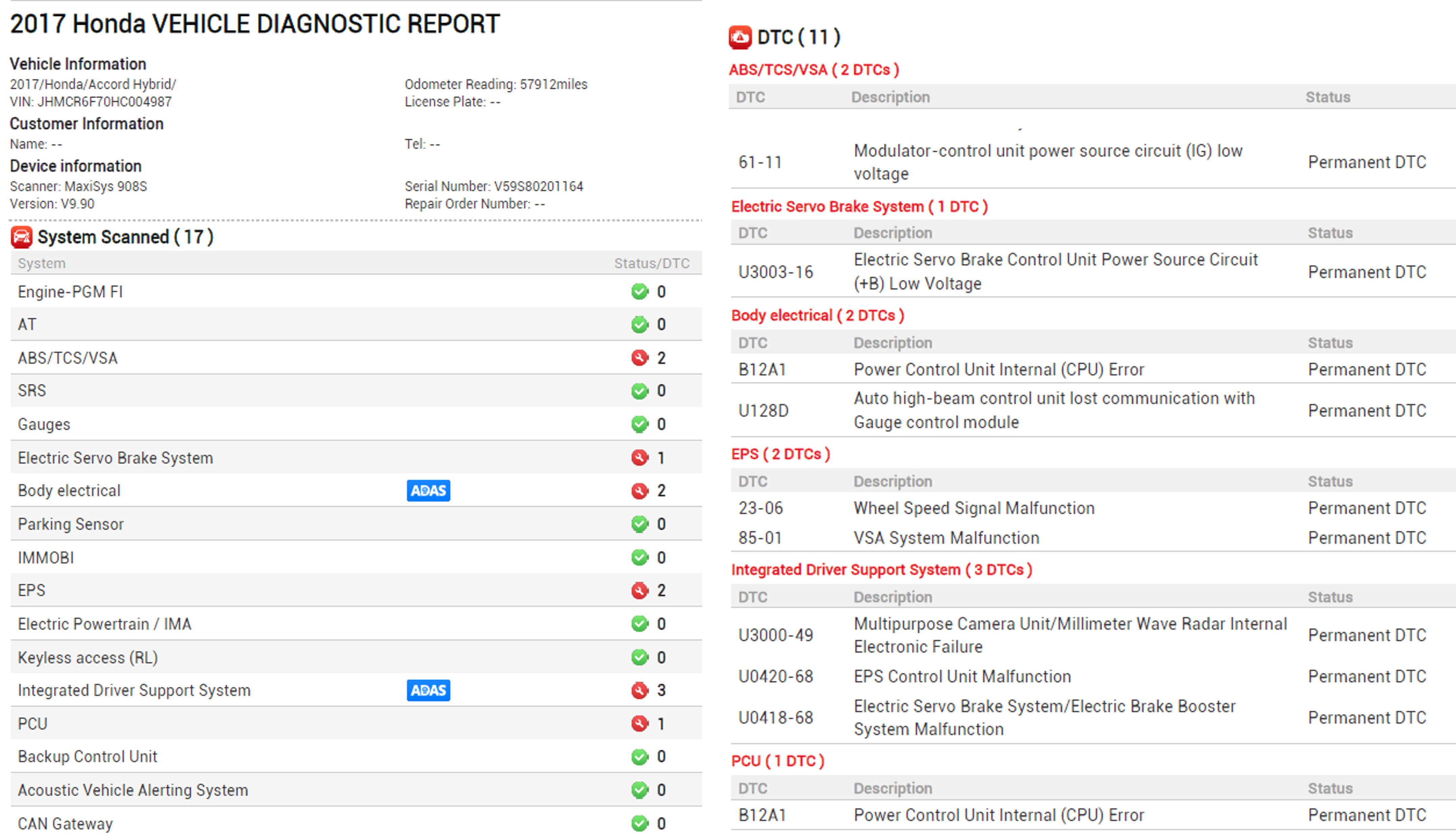
On the enhanced side of the aftermarket scan tool, many computers/modules can store valuable information. The critical thing to remember is that some of these computers/modules may be storing information that prevents a process, such as running readiness flag monitor tests.
Here are the pre- and post-scan results from an INNOVA 7111 scan tool. This vehicle underwent a pre-scan and had nothing to hide.

Here is a pre-scan from an AUTEL scan tool. This vehicle had a lot to hide from the global scan tool.
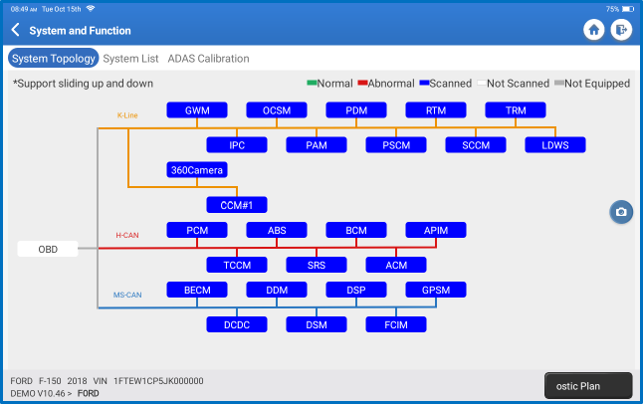
Network Topology Mapping
Network Topology Mapping is a graphical layout of the network. It serves a few purposes: it highlights the computers on the network, displays the number of DTCs stored in each computer, and provides quick access to each computer.